
/images/avatar_square.jpg

Using NeoPixels with Fadecandy

Introduction

Recently I have been tasked to create a small guide for using the NeoPixels together with the Fadecandy controller. We are going to use a single 8×8 NeoPixel board and a single Fadecandy controller.

Setup

Components

We are going to use very few components:

  • 1x Adafruit NeoPixel 8×8
  • 1x Fadecandy
  • 4x Jumper cables (male to male)
  • Header pins
  • Breadboard
  • Mini USB cable
  • Power Supply

Soldering

This is a one time thing and I just did it to make the NeoPixels easier to use later on.
Levenshtein Distance in C++

Introduction

When working with strings in programming, I’ve often had to compare them to other strings in order to find the same string. This is pretty simple using things like = or strcmp, but if the two strings are not 100% the same, but maybe have one letter different, a problem arise.

When working on my Bachelor thesis, I had a camera that scanned text strings and using OCR found the letters that matched the best. The OCR matched decently, but often one or two letters were not recognized correctly.

Build wirelessly to Android using Unity

I’ve been working on some Android application in Unity lately and with just two USB ports on my MacBook, it is annoying to remove the mouse and keyboard to plug in my Android device when building.

But this can also be done wirelessly using

1
adb

On Mac it is really easy to to get up and running. Using Homebrew just write:

1
brew install android-platform-tools

Plug in your Android device and write:

Programming the TelosB

Implementation

> Previous installation guide can be found here: Getting TinyOS to work on Linux using TelosB

USB connection

It is pretty hard to debug on the TelosB since it doesn’t have a native interface to read debug messages. It is possible to use the LED’s but they don’t show much. The TelosB has three LED’s and can only turn on or off, so the possibilities are limited.

Let’s try and set up a serial USB connection between the device and the computer, so we can read the debug messages on the screen.

Getting TinyOS to work on Linux using TelosB

Introduction

This guide is mainly written for myself to remember it and as a help for CpE 664 students at WVU. This guide is based on TinyOS - Automatic Installation and Eric Decker’s installation guide.

Installation

First download Virtual Box (Mac/Win), Parallels (Mac) or VMware Fusion (Mac) and install Ubuntu or any other Debian based Linux distro. Parallels has an automatic download of Ubuntu, so I chose that.

3D Printed RGB Lamp

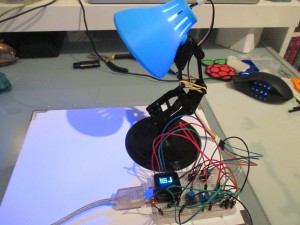
It is way overdue for me to write a little bit about this project. After getting access to a couple of 3D printers I wanted make something with the MicroView Arduino.

I went on Thingiverse and downloaded the stl for a lamp (link) and printed it using a Makerbot (the shade) and an ultimaker 2 (the stand/rest of the lamp). The result was pretty good.

The setup is pretty simple, I used 3 potentiometers to control the LED using analog in and then each potentiomater corresponds to a color in the RGB LED. The complete code can be found on my Github.